Planning a future visit? The September 2026 Tokyo conditions below are historical examples. Official pages may now describe a different tournament. Choose your event in the Japan Sumo Association’s ticket information and check its date, venue and conditions before booking. Link and QR guidance reviewed: 10 October 2026.
For the September 2026 Tokyo tournament, the official rules say a screenshot or printed copy of the QR ticket will not be accepted. Open the live ticket through the service used for purchase, and distribute tickets to companions who have a device before travelling to the arena. For a companion without a device, follow the procedure below.
This is particularly important for overseas visitors. A saved image may feel safer when mobile data is uncertain, but it is not a substitute for the valid ticket screen under the published rules.
Detailed description of this diagram
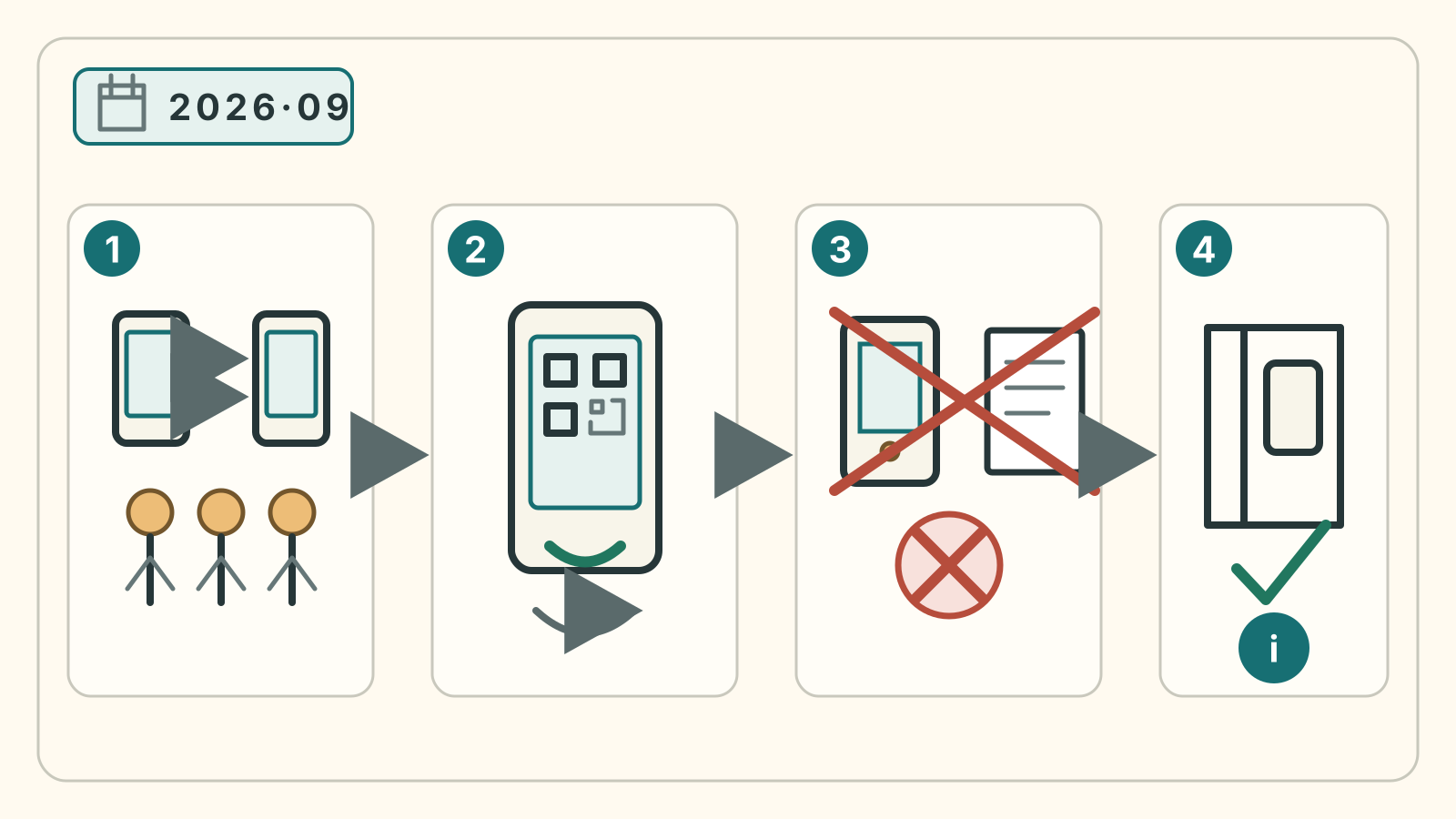
Four cards run from left to right. Card 1 uses two generic phone outlines and three abstract people to represent distributing group tickets to companions who have a device before arrival. For companions without a device, follow the separate procedure below. Card 2 shows a phone with a deliberately nonfunctional QR-like pattern, meaning that the valid ticket must be opened through the original service. Card 3 crosses out a saved phone image and a sheet of paper, representing the published refusal of screenshots and printouts. Card 4 shows a generic doorway and information symbol, representing the editorial fallback of stepping out of the entrance flow and showing staff the actual problem. No ticket-service interface, personal information, working code or real entrance geometry is reproduced. The graphic does not say that staff can validate an invalid ticket or grant an exception.
Editorial diagram: SUMO ARCHAEOLOGY CLUB. Ticket instructions: displaying the QR ticket and distribution and companions without a device, checked 10 October 2026. Stepping aside to ask staff is an editorial suggestion, not a promised admission exception.
When the QR code becomes visible
Ticket Oosumo opens distribution from midnight two days before the event. The admission QR itself appears from midnight on the event day. Both times are Japan time (JST). Before then, check the booking and sign-in; on the day, test the actual ticket screen before travelling.
Official instructions: displaying the ticket and distributing companion tickets.
Prepare before leaving Wi-Fi
- Sign in to the original ticket service and confirm the booking.
- Distribute tickets to companions who have a device using the service’s official function.
- Ask companions with devices to test access. Arrange the no-device procedure below for anyone without one.
- Charge every device and pack the correct cable or power bank.
- Keep the confirmation email and support details easy to find.
Checking the booking and sign-in in advance is useful because it exposes forgotten passwords or account errors. Test the actual QR screen once it is available on the event day. Do not rely on the image left in your photo library after that test.
What if a companion has no device?
Ticket Oosumo instructs visitors without a device to arrive with the purchaser who has one and speak to staff before entry. The service gives a child without a device as an example. Do not assume that every visitor must own a phone, or that a screenshot replaces this procedure.
What if the group arrives together?
For companions who have a device, distribution is still the normal procedure even when you plan to arrive together. A group can be separated by a train delay, a restroom stop or a different security line. For anyone without a device, follow the purchaser-and-staff procedure above instead.
Visitors aged four and over require a ticket for this tournament. Count tickets against travellers, including children, rather than assuming a young child enters free.
If your battery is the worry
Use low-power mode while travelling, avoid draining the phone with video, and leave enough charge to brighten the screen at the gate. A small power bank can be more important than a camera accessory on a digital-ticket day. If you are flying, check the airline’s current battery rules as well.
What remains unknown: The notice checked does not publish an individual recovery process for a broken device, failed connection or inaccessible account. It does not promise that staff can turn a saved image into a valid ticket or grant an admission exception.
Fallback: Do not edit a QR image or try another person’s code. Step out of the entrance flow, prepare the purchase record and legitimate account, then ask the ticket service or venue staff. Admission depends on the official response, not on this guide.
Re-entry is a separate rule
Having a working QR ticket does not mean unlimited re-entry. The September 2026 Tokyo guidance checked for this article permitted one re-entry per day. Confirm the rule for your actual tournament. Ask staff for the correct procedure before leaving the building.
Five minutes of preparation protects the best first moment: walking in and hearing the arena instead of staring at a login screen.
Source
- Japan Sumo Association, September 2026 spectator rules; checked September 4, 2026.
Source links used for verification
This is the official link consulted for the September record. Its content may change for later tournaments; the historical check date below does not verify a new event. The Ticket Oosumo display and distribution links in the article were rechecked separately on 10 October 2026.
Article verified: